Welcome to GOOGLE Home for Web! 🎉
Thank you for installing GOOGLE Home for Web, your essential companion for Google Home Web that adds desktop notifications, quick controls, and smart window management to enhance your smart home experience.
🚀 Quick Start: Pin the extension to your toolbar, open home.google.com, and start using the floating toolbar that appears in the bottom-right corner. Enable notifications to get desktop alerts for Google Home events.
💡 Designed for Smart Home Management: GOOGLE Home for Web helps you manage your smart devices more efficiently with features like separate windows, fullscreen mode, one-click refresh, and auto-start options.
🔒 Privacy First: All features run locally in your browser. We don't collect data, access your Google Home devices, or connect to external servers.
For the best experience, keep the extension pinned to your toolbar and enable notifications when prompted by your browser.
How to Use GOOGLE Home for Web
Our extension enhances your Google Home Web experience with smart productivity features. Here's a complete guide to get started:
Key Features
- Desktop Notifications: Get notified of Google Home alerts and events on your desktop
- Unread Badge: See notification count directly on the extension icon
- Floating Toolbar: Quick-access controls inside Google Home Web interface (bottom-right corner)
- One-Click Refresh: Refresh Google Home Web instantly with a single click
- Auto-Start: Automatically open Google Home Web when you start your browser
- Separate Window: Open Google Home in a clean, dedicated popup window
- Fullscreen Mode: Toggle fullscreen view for focused smart home management
- Incognito Mode Support: Optional private browsing access (requires enabling)
- Sound Control: Toggle notification sounds on/off
- Lightweight & Efficient: Minimal resource usage
Getting Started
Install and Pin Extension
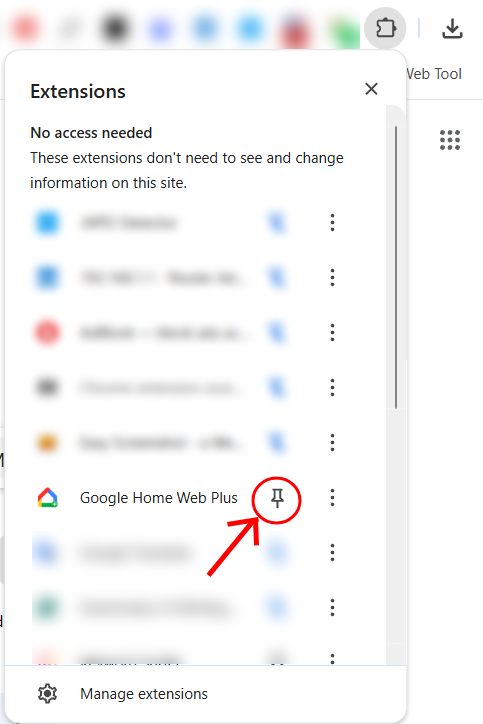
After installing from Chrome Web Store, make sure to pin the extension to your toolbar (click the puzzle icon, find GOOGLE Home for Web, and click the pin icon).
Open Google Home Web
Go to home.google.com and log in to your Google account. The extension will automatically activate.
Access the Floating Toolbar
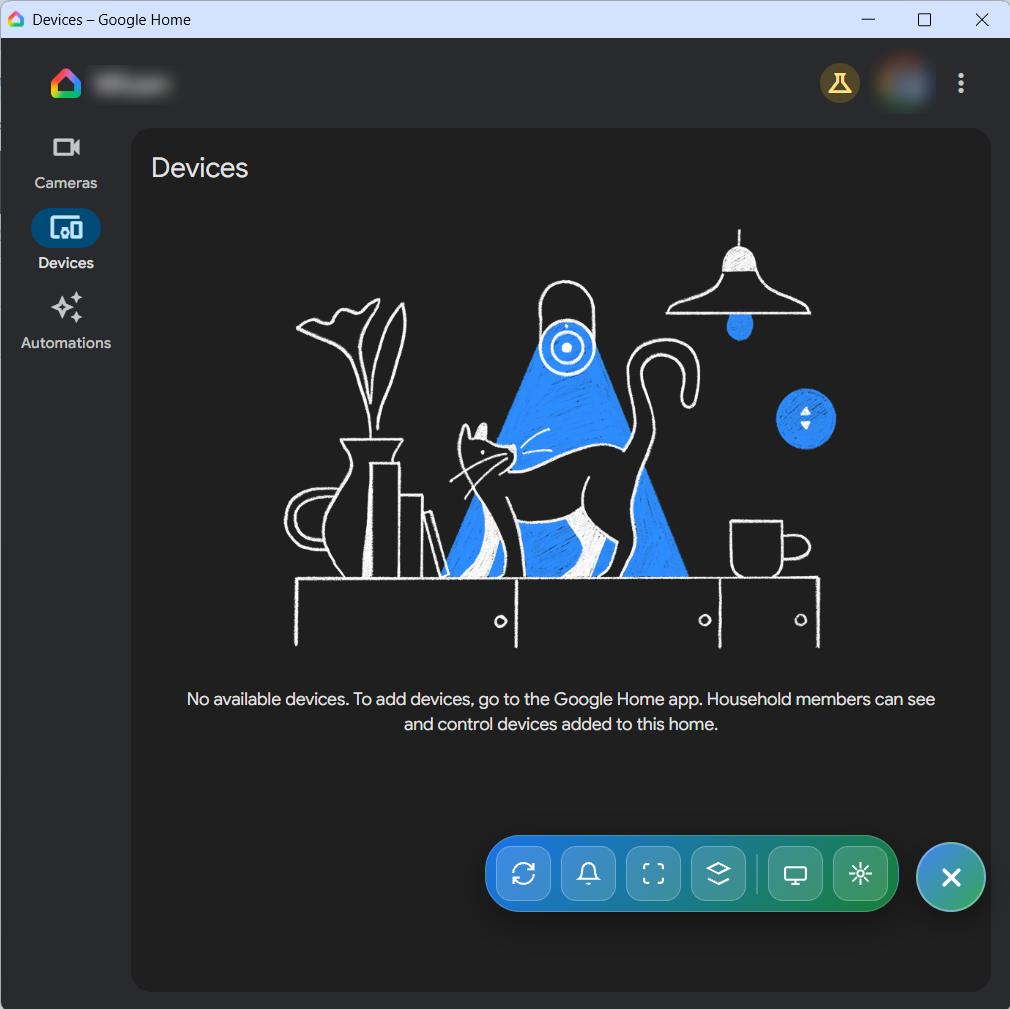
Once Google Home Web loads, you'll see a compact floating toolbar appear in the bottom-right corner of the interface. This gives you quick access to all features.
Using Key Features
Desktop Notifications Setup
When alerts appear on Google Home Web, your browser will ask for notification permissions. Click "Allow" to enable desktop notifications.
Tip: If you accidentally blocked notifications, click the lock icon in your browser's address bar and change the notification setting to "Allow".
Window Controls
Use the floating toolbar to:
- 🌐 Open in Popup Window: Click the window icon to open Google Home in a separate popup window
- 🔲 Fullscreen: Toggle fullscreen mode for focused device management
- 🔄 Refresh: Instantly reload Google Home Web if needed
- 🎯 Focus Window: Quickly bring Google Home Web to the front
Unread Notification Badge
The extension icon in your toolbar will show a blue badge with the number of unread notifications. Click the icon to quickly jump to Google Home Web.
Auto-Start Configuration
Right-click the extension icon and select "Options" to enable auto-start. Google Home Web will automatically open when you launch Chrome.
Important: This extension only works with the official Google Home Web interface at home.google.com. It does not work with the Google Home mobile app.
Privacy & Security Information
GOOGLE Home for Web operates entirely locally in your browser. We do not:
- Collect or store any personal data
- Access your Google Home devices or settings
- Send data to external servers
- Track your usage or analytics
- Intercept your Google Home communications
All features are implemented using standard browser APIs for notifications and window management. Your Google Home data remains secure with Google's existing security measures.
Troubleshooting
Extension Not Working?
If the extension doesn't seem to be working, try these steps:
- Refresh GOOGLE Home for Web: Completely reload the GOOGLE Home for Web page (Ctrl+F5 or Cmd+Shift+R)
- Toggle Extension: Go to chrome://extensions/, find GOOGLE Home for Web, and toggle it off and on
- Restart Chrome: Close and reopen your Chrome browser
- Reinstall: Remove and reinstall the extension from the Chrome Web Store
If problems persist, please contact us at [email protected].