Welcome to SNAPCHAT for Web ! 👻
Thank you for installing SNAPCHAT for Web , the ultimate companion for Snapchat Web that adds desktop notifications, unread snap tracking, story alerts, and smart window management to enhance your social experience.
🚀 Quick Start: Pin the extension to your toolbar, open www.snapchat.com, and look for the floating toolbar in the bottom-right corner. Enable notifications to get desktop alerts for new snaps and stories.
💡 Designed for Snapchatters: SNAPCHAT for Web helps you stay connected with friends and creators through powerful desktop features like instant snap notifications, story updates, unread counters, quick access, and auto-start options.
🔒 Privacy First: All features run locally in your browser. We don't collect your snaps, messages, or any personal data. Your conversations remain private and secure.
For the best experience, keep the extension pinned to your toolbar and enable notifications when prompted by your browser.
How to Use SNAPCHAT for Web
Our extension transforms Snapchat Web into a powerful desktop application. Here's your complete guide to getting started:
Key Features
- Instant Snap Notifications: Get desktop alerts for new snaps and chats even when the tab is in background
- Unread Snap Counter: See pending snap and message count directly on the extension icon
- Story Alerts: Never miss stories from your close friends with real-time notifications
- Floating Quick Toolbar: Access key Snapchat features right from the web interface
- One-Click Refresh: Refresh your Snapchat feed instantly
- Auto-Start: Automatically open Snapchat Web when you start your browser
- Window Management: Focus and manage your Snapchat window with one click
- Immersive Mode: Fullscreen stories and snaps for better viewing
- Sound Control: Customize notification sounds for snaps, chats, and stories
- Side Panel Support: Keep Snapchat accessible while browsing other sites
- Dark Mode: Enhanced dark theme for Snapchat Web
- Lightweight & Fast: Zero impact on browser performance
Getting Started
Install and Pin Extension
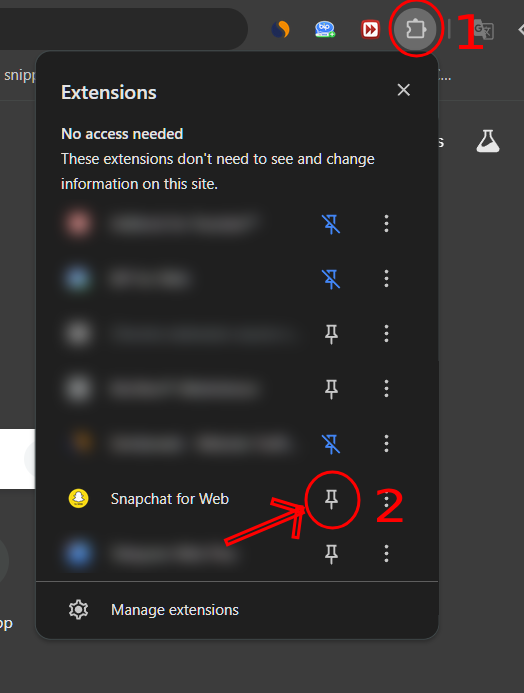
After installing from Chrome Web Store, pin SNAPCHAT for Web to your toolbar. Click the puzzle icon, find the extension, and click the pin icon to keep it easily accessible.
Open Snapchat Web
Go to www.snapchat.com and scan the QR code with your phone to log in. The extension will activate automatically.
💡 Pro Tip: You can stay logged in by checking "Remember me" during QR login.
Find the Floating Toolbar
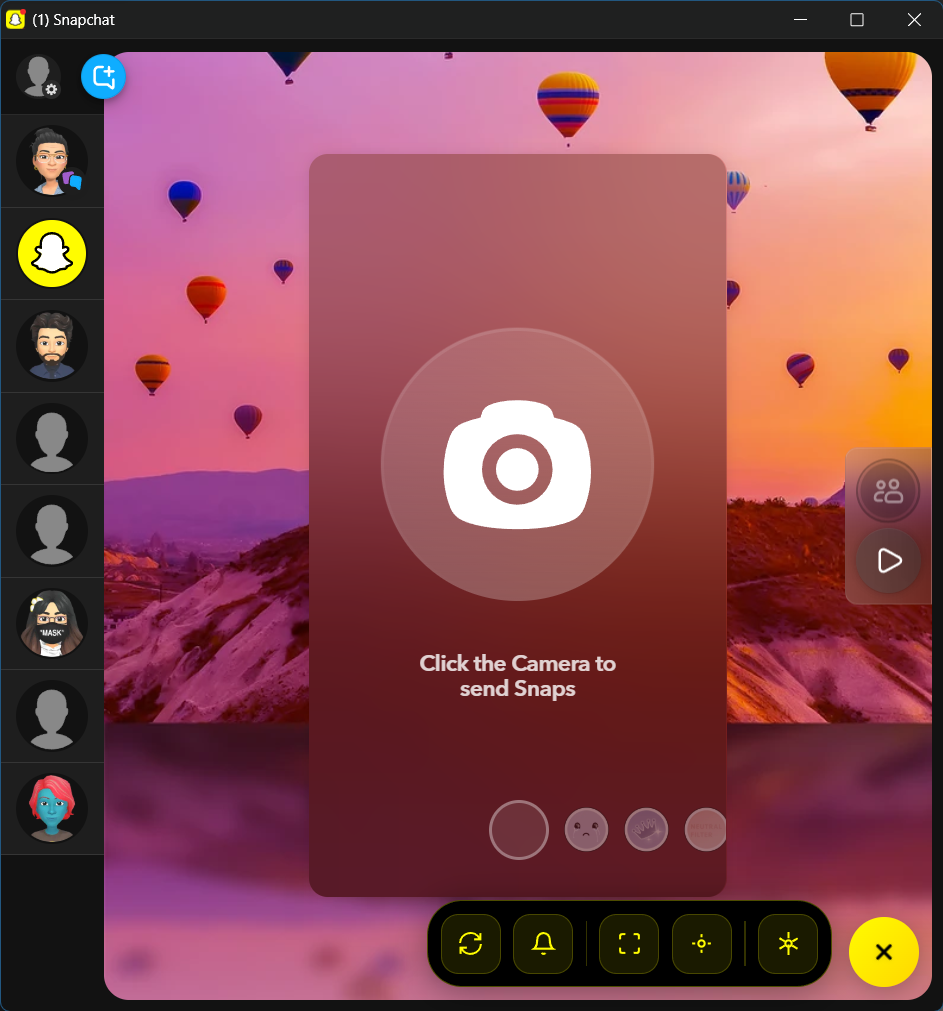
Once Snapchat Web loads, you'll see our sleek floating toolbar in the bottom-right corner. This is your command center for all SNAPCHAT for Web features.
Using Key Features
Enable Snap Notifications
When you receive your first snap or chat, Chrome will ask for notification permission. Click "Allow" to get desktop alerts for:
- 📸 New snaps from friends
- 💬 Chat messages
- 📱 Story updates
- 🔥 Friend activity
🔧 Troubleshooting: If notifications don't appear, click the lock icon in your address bar and set notifications to "Allow".
Track Unread Snaps
The extension icon displays a yellow badge with your total unread snaps and messages. Click the icon to instantly jump to Snapchat Web and view your pending snaps.
✨ Live Counter: The badge updates in real-time as you receive and view snaps!
Story Notifications
Get notified when your close friends post new stories. Configure which friends' stories trigger notifications in the extension settings.
Quick Toolbar Actions
Use the floating toolbar for instant access to:
- 📸 New Chat: Quickly start a new conversation
- 🔔 Notifications Toggle: Mute/unmute all notifications
- 🌙 Dark Mode: Toggle Snapchat's dark theme
- 📱 Fullscreen Stories: Watch stories in immersive mode
- 🔄 Refresh Feed: Update your Snapchat feed
- ⚙️ Settings: Customize extension preferences
Auto-Start Configuration
Right-click the extension icon and select "Options" to enable auto-start. Snapchat Web will automatically open when you launch Chrome, so you never miss a snap.
⚠️ Important: This extension only works with official Snapchat Web at www.snapchat.com. You need a valid Snapchat account and must log in via QR code with your phone.
Privacy & Security
SNAPCHAT for Web respects your privacy completely. We do not:
- ❌ Access or store your snaps, chats, or media
- ❌ View your friends list or conversations
- ❌ Track your activity or analytics
- ❌ Send any data to external servers
- ❌ Interfere with Snapchat's encryption
All features work locally in your browser using standard Chrome APIs. Your Snapchat experience remains exactly as secure as Snapchat designed it.
Perfect For
Why You'll Love SNAPCHAT for Web
- ⏱️ Never Miss a Snap: Desktop notifications ensure you respond quickly
- 📊 Stay Updated: Story alerts keep you in the loop with friends
- ⌨️ Desktop Efficiency: Type faster with your keyboard, view snaps on big screen
- 🎯 Focus When Needed: Mute notifications during meetings or deep work
- 🔄 Seamless Workflow: Keep Snapchat open while doing real work
Customization Options
Auto-Start with Browser
Snapchat Web opens automatically when Chrome starts. Perfect for daily Snapchatters!
Smart Mute
Schedule quiet hours or mute notifications with one click from the toolbar.
Friend Filters
Choose which friends trigger notifications for stories and snaps.
Sound Profiles
Different sounds for snaps, chats, and stories. Or go completely silent.
Dark Mode Toggle
Force dark mode on Snapchat Web for comfortable nighttime use.
Debug Tools
Advanced troubleshooting and connection monitoring options.
Support & Troubleshooting
Frequently Asked Questions
Q: Why am I not receiving snap notifications?
A: First, check that Chrome notifications are enabled: click the lock icon in your address bar and set notifications to "Allow". Also verify that Snapchat Web is open and you're logged in. The extension needs an active session to detect snaps.
Q: The unread counter shows 0 but I have snaps!
A: Try refreshing the Snapchat Web page. The counter reads from the page interface - if Snapchat Web itself isn't showing the unread count, the extension can't detect it. Make sure you're not in "Do Not Disturb" mode.
Q: Can I use this with multiple Snapchat accounts?
A: Yes! Simply log out and scan a different QR code. The extension will automatically work with whichever account is active in Snapchat Web.
Q: Does this work with Snapchat+ features?
A: The extension works with standard Snapchat Web features. Some Snapchat+ features may not be fully supported on the web version.
Q: Is my login information secure?
A: Absolutely. The extension never sees your QR code or login credentials. You authenticate directly with Snapchat's servers via QR code scanning on your phone.
Q: Can I customize notification sounds?
A: Yes! Open extension settings from the floating toolbar or right-click menu. You can choose from 5 different sound packs or upload custom sounds.
Q: Why does Snapchat Web keep asking me to log in?
A: Snapchat Web sessions expire after some time for security. Use the "Remember me" option when logging in to extend your session. The extension cannot bypass Snapchat's security policies.
Q: The floating toolbar disappeared!
A: Click the extension icon in your toolbar to reopen the toolbar on Snapchat Web. If it still doesn't appear, refresh the page.
Still Need Help?
Enable debug mode in extension settings to see detailed logs. Visit our Chrome Web Store listing for the latest updates, community discussions, and support resources.
📧 Contact Support: [email protected]
Pro Tips for Power Users
🎨 Customize the Floating Toolbar
Right-click any button on the floating toolbar to customize which buttons appear. Remove what you don't use, add what you need!
⌨️ Keyboard Shortcuts
Press Ctrl+Shift+S (Windows) or Cmd+Shift+S (Mac) to toggle Snapchat Web. Customize shortcuts in Chrome extensions page.
📱 Better Together
Use SNAPCHAT for Web with your phone's Do Not Disturb mode for uninterrupted desktop work while staying reachable.
🔄 Quick Session Switch
Create multiple Chrome profiles with different Snapchat accounts logged in. Switch between profiles with one click!
📊 Story Analytics
Pro tip: Keep SNAPCHAT for Web running in the background during story posting to get immediate desktop notifications when friends view your stories!
🔊 Sound Customization
Set different notification sounds for specific friends. Great for knowing when your best friends or partner snap you!
Love SNAPCHAT for Web ?
If you're enjoying the extension, here's how you can support development:
⭐ Rate Us
Leave a 5-star review on the Chrome Web Store. It helps others discover the extension!
📢 Share
Tell your Snapchat friends about the extension. Perfect for groups and teams!
🐛 Report Issues
Found a bug? Have an idea? Let us know through the Chrome Web Store support section.
Changelog & Updates
Version 1.0.0 - Initial Release
- ✅ Desktop notifications for snaps and chats
- ✅ Unread snap counter on extension icon
- ✅ Floating toolbar with quick actions
- ✅ Story notifications for close friends
- ✅ Dark mode toggle
- ✅ Auto-start with Chrome
- ✅ Side panel support
- ✅ Custom notification sounds
Troubleshooting
Extension Not Working?
If the extension doesn't seem to be working, try these steps:
- Refresh SNAPCHAT for Web : Completely reload the SNAPCHAT for Web page (Ctrl+F5 or Cmd+Shift+R)
- Toggle Extension: Go to chrome://extensions/, find SNAPCHAT for Web , and toggle it off and on
- Restart Chrome: Close and reopen your Chrome browser
- Reinstall: Remove and reinstall the extension from the Chrome Web Store
If problems persist, please contact us at [email protected].